Built to Learn: The Marketing Strategy Edition — CMO Desk and SWOT Check

CMO Desk: The STP App
The first app teaches Segmentation, Targeting, and Positioning. But it doesn't let you jump straight to picking a target market. It makes you do the analysis first.
The flow goes: read a business scenario, work through a full 5C situation analysis — Company, Competitors, Customers, Collaborators, Climate — answer a question for each one, then make your STP decisions. Only after that do you get a theory check and a results page that shows the whole chain from your analysis to your choices.
I built it that way because I've lived the alternative. Twenty years in IT, often in small business, I was frequently the person who had to figure out the marketing strategy because I was the most technically competent person in the building. And I learned, before even taking a single marketing course, that jumping to strategy without understanding the landscape is how you waste time and money. You figure out where you are first. Then you decide where to go.
The app has 15 scenarios across three difficulty tiers. Beginner, intermediate, advanced. Each one has a trigger event, a full situation analysis, graded questions, and a concept check. All of them are fictional — no real brands, no real companies.
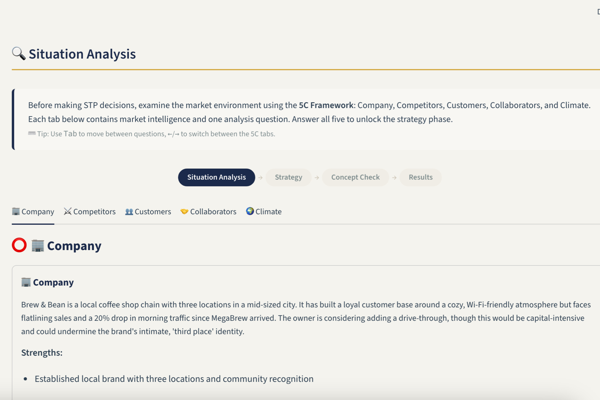
This was my first proper attempt at a more thorough learning app, complete with tests. There are a lot of tiny features that all came about through iterations of what would make learning easier from a user experience perspective. The analysis questions give you feedback right away — a green check or an amber warning with a model answer you can expand — so you can correct yourself before you make strategy decisions based on bad analysis. The strategy tabs show the relevant analysis data directly above each question, so you never have to click back to re-read the scenario. And you need 75 out of 100 points to master a scenario and unlock the next tier. It's small, but it reinforces some level of understanding before moving on.
I built this during the first week of my marketing strategy course. Before we'd covered much of the material. That meant I was making assumptions about what the right approach was. Some of those assumptions held up. One of them didn't, and I found out about it while building the second app.
The Second App and the Thing I Got Wrong
The second app was supposed to teach SWOT analysis. But what I actually built, at first, was a TOWS pairing trainer.
Here's what happened. I was building in Streamlit, which is a Python framework designed for data dashboards — not for interactive learning tools. I quickly discovered that Streamlit has no native drag-and-drop support. No way to let students physically move items into quadrants. That's a real problem when you're trying to build a SWOT tool, because the core exercise is categorization: is this factor a strength, weakness, opportunity, or threat?
Working within what the framework could actually do, I landed on a different interaction model. Instead of dragging items into quadrants, students would select items and pair them — match an internal factor with an external factor to form a strategic pair. That's click-and-choose, not drag-and-drop. Streamlit handles that fine.
It turns out that click-and-choose pairing is exactly what the TOWS matrix does. You take your strengths and pair them with opportunities. You pair weaknesses with threats. You build strategies by connecting internal factors to external ones. It's a legitimate strategic planning tool. It just wasn't the tool I originally set out to build.
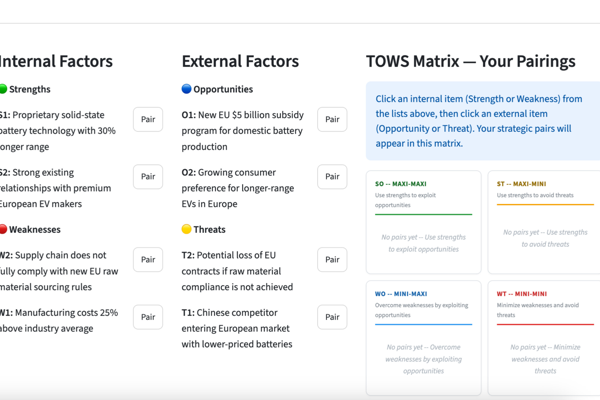
I had accidentally built a TOWS trainer instead of a SWOT trainer. And for a while, I didn't realize they were different things. Then my course covered SWOT properly, and I looked at my app and thought: oh. That's not quite right.
The Pivot
So I went back and added the drag-and-drop categorization mode. Students now read a scenario, see unlabeled candidate items — no hints about which quadrant they belong in — and place them into the correct S, W, O, or T bucket. Or into a fifth bucket I added: the Discard pile.
The discard pile exists because it's too easy when everything has a neat place to go. In real strategic analysis, some information just isn't relevant. It's not a strength, not a weakness, not an opportunity, not a threat — it's just noise. Being able to recognize noise and set it aside is a real skill.
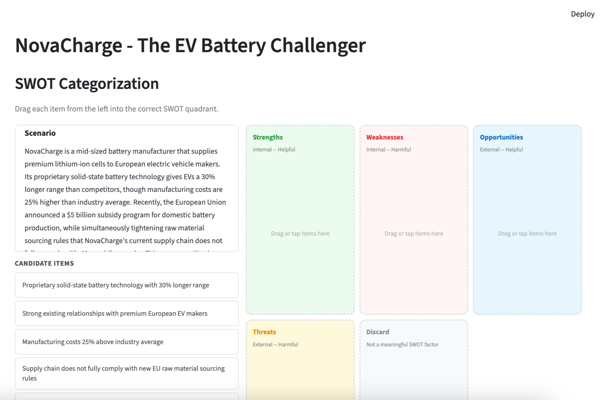
The drag-and-drop rebuild was painful. Streamlit's custom component system is not designed for this. The v1 API doesn't return values from your custom HTML and JavaScript — it's a one-way street. Python can push content to the browser, but the browser can't talk back. I spent hours debugging why my drag-and-drop events were doing nothing before I figured out they could never have worked. I had to migrate to a newer version of the component API, which required upgrading Python and Streamlit. It worked, but it was the kind of engineering detour that makes you question whether you're using the right tool for the job.
That migration also solved the state problem I kept hitting. Streamlit reruns your entire script on every user interaction. That's fine for a chart that needs to reflect a new filter. It's terrible for tracking which of five analysis questions a student has answered across a fifteen-minute session. Click one radio button and the whole page rerenders. If you haven't carefully preserved your state, things get forgotten. I spent a lot of time building state management workarounds that wouldn't be necessary in a framework that treats multi-step flows as a normal use case.
The Engineering Decision That Shaped Everything
At one point during the rebuild, I added a magnitude rating system — rate each factor's importance on a scale of 1 to 3. It's a standard part of SWOT. The literature mentions it. My course covered it.
Then I removed it a few sprints later.
The reason: TOWS already does what magnitude ratings do. A strength that pairs with multiple opportunities is implicitly more important than one that pairs with none. The pairing exercise itself forces prioritization. Maintaining a separate magnitude system on top of that was duplication of effort. Something I'd already built and tested — the TOWS engine — was more robust than something I was still developing. From a software engineering management perspective, the right call was to keep the working system and drop the redundant one.
That decision shaped the whole app. Instead of two features fighting for the same pedagogical space, there's one feature that does the job cleanly. The app is smaller, simpler, and more focused because I was willing to cut something that looked important on paper but was redundant in practice.
What I'd Tell Someone Building Learning Tools
If you're considering building a tool to teach yourself something, here's what I've learned from doing it four times, now.
Build alongside the course, not ahead of it. The app I built during the first week — before I knew what SWOT actually requires — ended up being the wrong thing. I caught it and fixed it, but I could have saved the rework by letting the course material guide the build.
Don't fight your framework's limits. If you pick a tool that can't do what you need, you'll spend more time on workarounds than on the learning experience. I'm not sure I'd pick Streamlit again for this kind of project. Something with better support for stateful interactions and drag-and-drop would have saved me weeks.
Cut features that duplicate each other. When I realized TOWS and magnitude ratings were doing the same job, I killed the magnitude system. The app got better because it got simpler. That's basic engineering discipline, and it applies to learning tools as much as anything else.
And include the discard pile. Real analysis is as much about what you leave out as what you put in.
CMO Desk — live app | github repo
SWOT Check — live app | github repo
Built with Python and Streamlit. If you want to talk through the architecture or the design decisions, get in touch.